
Parlourly
Every haircut counted, in two taps. Parlourly is a salon billing and accounts app from Hibacu Labs for barbershops and beauty parlours. It records services, expenses, bookings and bills on your phone, works without internet, and does not need customers' phone numbers. It comes as Parlourly for Android, Parlourly Desktop for Windows and Linux, and Parlourly Cloud for salons with staff on several phones or more than one branch.
- Category
- Salon Billing and Accounts App
- Availability
- Available
- Pricing
- Android: one-time purchase. Cloud: monthly plans. Desktop: ask us.
- Built for
- Barbershops, Beauty parlours, One-person salons, Small salons with a few staff, Salons with more than one branch (Parlourly Cloud)
- Works with
- WhatsApp, Bluetooth and PC receipt printers, Google Drive backup, Excel export
Product
Parlourly in use
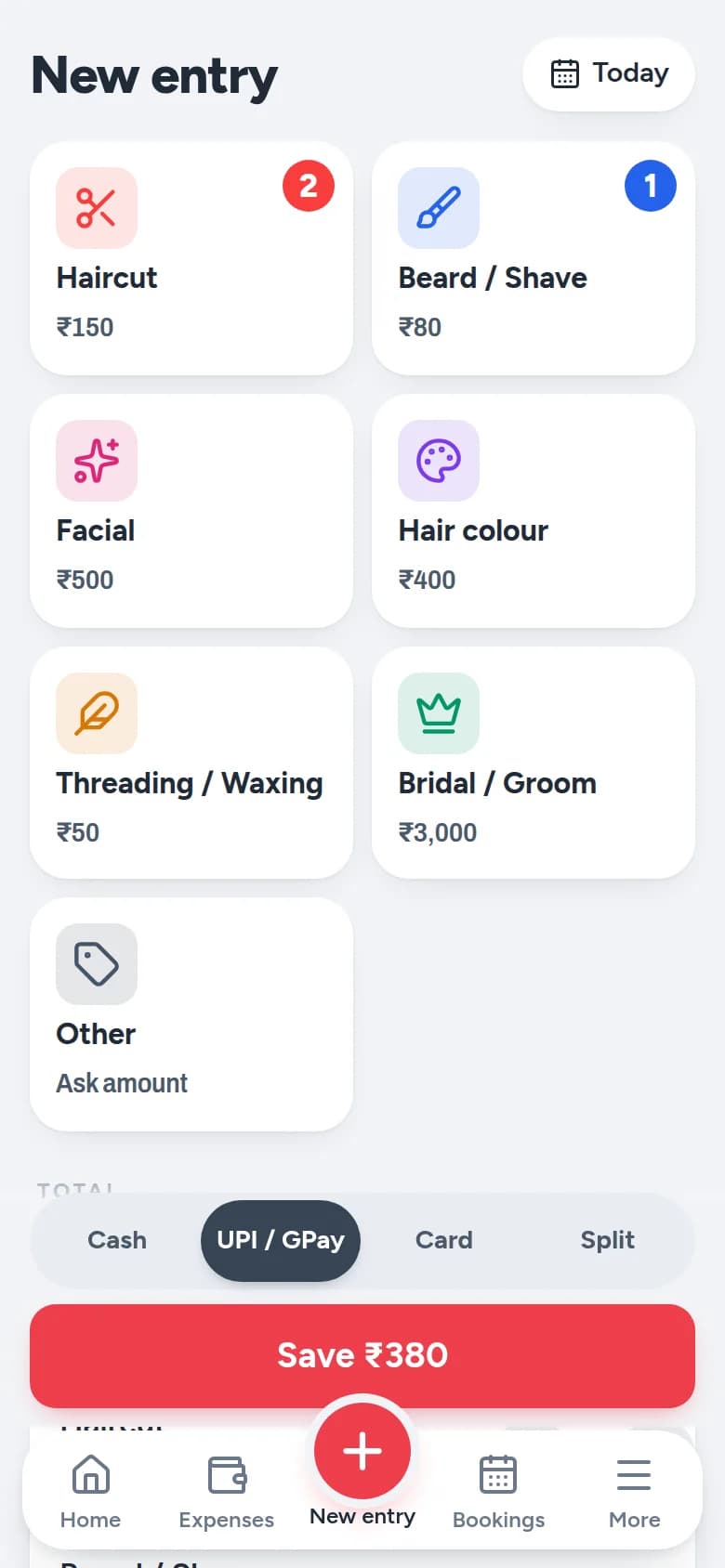
Tap the services, choose how they paid, save. 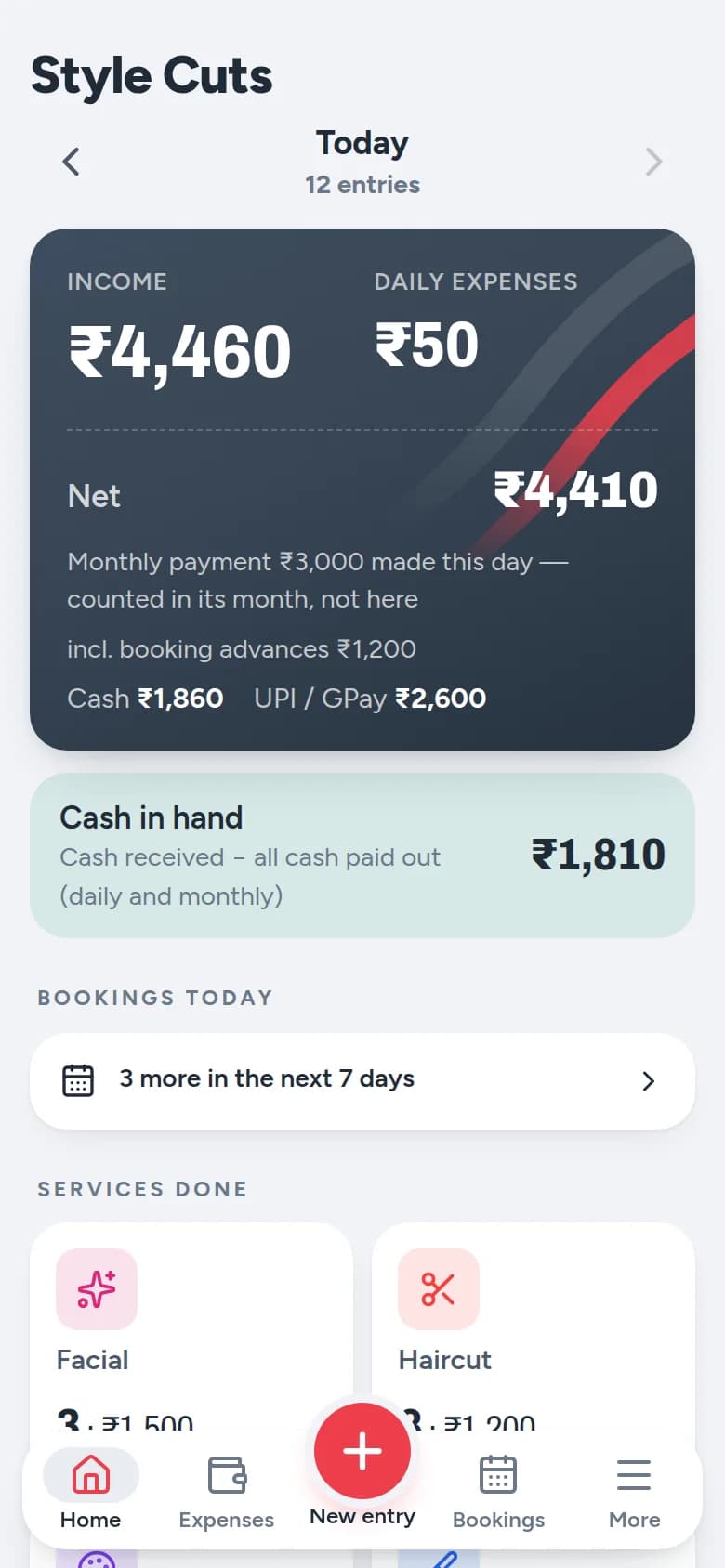
The day at a glance. 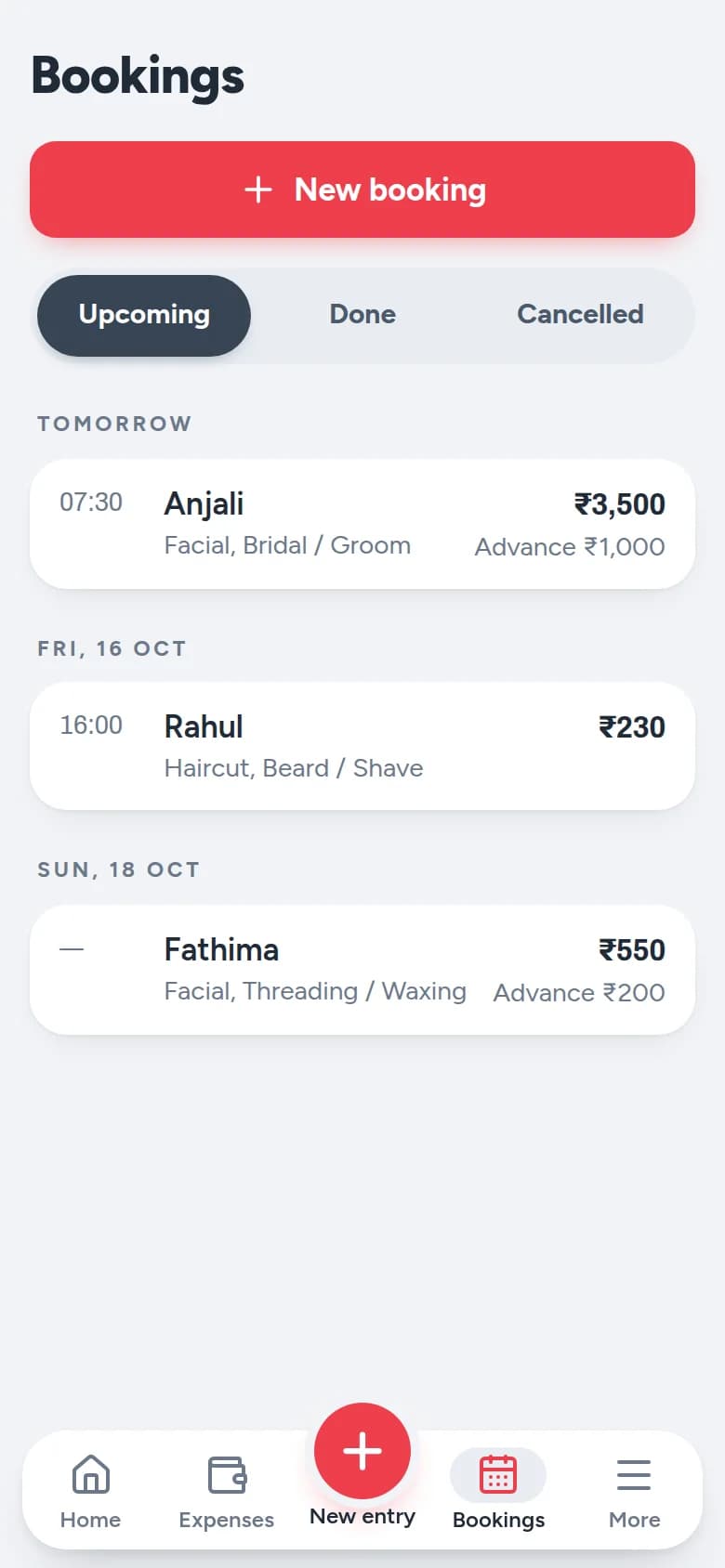
Bookings with advance. 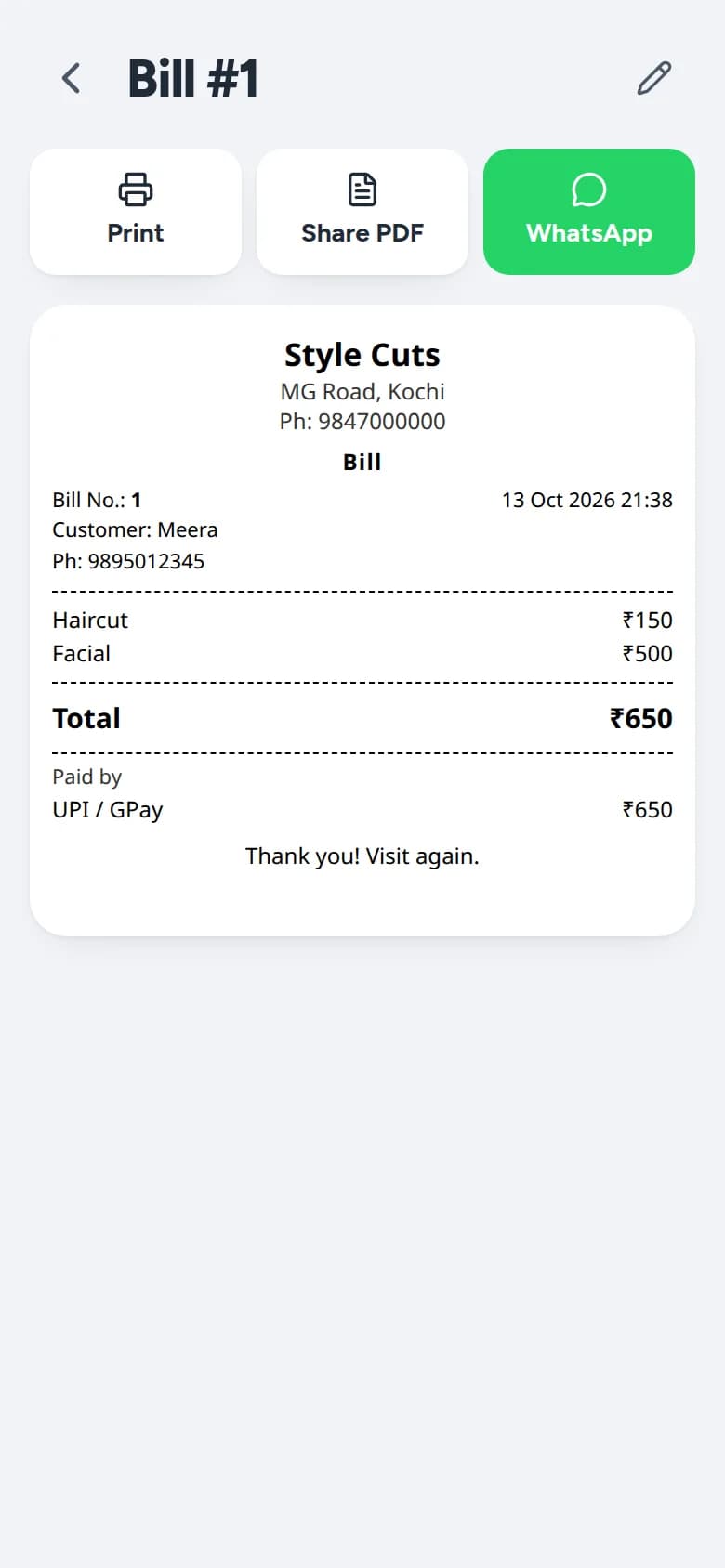
A numbered bill to print, share as PDF or send on WhatsApp. 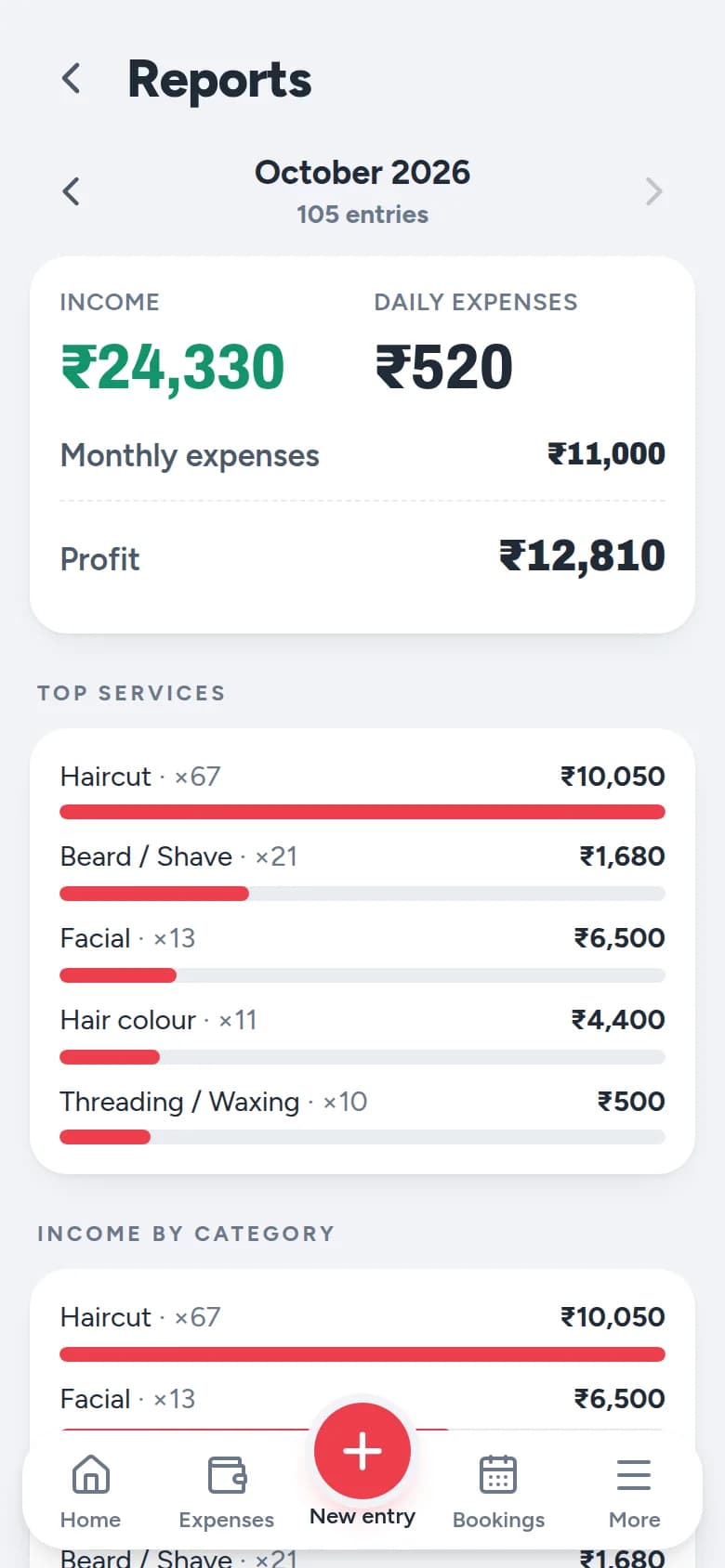
Month-end profit and top services.
Screens show sample data for a demo salon.
The problem
What Parlourly fixes
Accounts that slow down the counter
Writing every service down by hand costs time between customers.
Not knowing how the day went
Owners want to see income, expenses and cash in hand before they close for the day.
Asking every customer for a name and number
Most walk-in entries are just a service and a price, so a form for every customer gets in the way.
Accounts lost with a lost phone
If the records live on one phone, a broken or stolen phone can mean lost accounts.
Core features
What Parlourly includes
Two-tap entry
Your services are big buttons with your prices on them. Tap what you did, choose Cash or UPI, save. Nobody is asked for a name or a phone number.
- Set your own services and prices
- Part cash, part UPI? Split it
- Forgot yesterday's customer? Enter it for yesterday
The day at a glance
Know how today went before you close.
- Income, the day's small expenses, what is left, and the cash that should be in your drawer
- How many haircuts and facials you did, with the amount next to each
- Cash in hand and UPI worked out for you
- Rent, electricity and salary count for the month, not the day you pay
Bridal bookings with advance
Note the date, the services and the advance.
- Tap Mark done on the day and collect only the balance
- The advance counts on the day you received it, never twice
- Cancelled? Keep the advance or record the refund
- Today's and this week's bookings on the home screen
Bills: print, PDF or WhatsApp
Any saved entry becomes a numbered bill with your salon's name on it.
- Print on a Bluetooth receipt printer, save as a PDF, or send on WhatsApp
- GST is there if you are registered, and off if you are not
- GST is included in your price, so the customer pays what you charged
Month-end profit and reports
See what is left after rent and salaries.
- Profit for the month once rent, electricity and salaries are paid
- Top services, where the money went, and every day in a simple table
- Export to Excel for your accountant
- Staff commission and salary balance, if you have staff
- Product stock with a low-stock reminder, if you want it
Your data in your hands
Android and Desktop keep everything on your own device.
- No server, no account and no monthly fee on Parlourly for Android
- Daily automatic backup to the SD card or a folder you choose
- Save a copy to Google Drive or a pen drive any time
- PIN lock so only you open the accounts
- Edits and cancellations keep a history
English, Malayalam and Hindi
Switch language at any time. Bills always print in English.
Versions
Choose your version of Parlourly
Parlourly for Android
For a one-person salon, or a small shop with a helper or two.
- Your phone is the counter, with nothing else to buy
- Works with no internet, all day
- Data stays on the phone, with backup to an SD card or Google Drive
- English, Malayalam and Hindi
- Runs on Android 8 or newer, including budget phones
Available now. Message or call us and we will set it up on your phone with your services and prices. A Google Play listing is on the way.
Parlourly Desktop
For the Windows or Linux computer at your counter.
- The same quick entry, accounts and bills on a bigger screen
- Works offline, with data kept on your computer
- Print bills on the receipt printer connected to your PC
- English, Malayalam and Hindi
Available now for Windows and Linux. Enquire on WhatsApp or call us.
Parlourly Cloud
For salons with staff on several phones, or more than one branch.
- Each staff member gets their own login
- Only the owner can edit or cancel a bill, and every change is recorded
- Salary, commission, stock and reports in one place
- Premium sends every bill and festival offers to customers on WhatsApp automatically
Needs internet. Monthly plans: Regular and Premium. Book a demo.
Process
How it fits into your day
- 01
Tap what you did
Your services are big buttons with your prices on them.
- 02
Choose Cash or UPI
Split the payment if the customer pays part in each.
- 03
Save, and share the bill if asked
Every saved entry becomes a numbered bill you can print, save as a PDF or send on WhatsApp.
- 04
Check the day before you close
Income, expenses and the cash that should be in your drawer are on the first screen.
- 05
Export the month for your accountant
See the profit after rent and salaries, and export to Excel.
Who it is for
What changes for you
- Record a customer in two taps, with no name or phone number needed
- Know how the day went before you pull the shutter down
- Works fully offline on Android and Desktop
- Daily automatic backups, so a lost phone does not mean lost accounts
Built for
- Barbershops
- Beauty parlours
- One-person salons
- Small salons with a few staff
- Salons with more than one branch (Parlourly Cloud)
Security and reliability
Built by a team that tests and secures software for a living
- Android and Desktop keep your data on your own device, with no server and no account
- PIN lock so only you open the accounts
- Edits and cancellations keep a history
- Parlourly Cloud: separate staff logins, and only the owner can edit or cancel a bill
Pricing and availability
How to get started
Parlourly is available. All three versions are available now. Parlourly for Android is a one-time purchase for your phone. Parlourly Cloud is a monthly plan, Regular or Premium, and needs internet. For current prices, or for Parlourly Desktop pricing, message us on WhatsApp or call +91 92920 26056 and we will help you choose the right version.
FAQ
Frequently asked questions
What is Parlourly?
Parlourly is a salon billing and accounts app by Hibacu Labs for barbershops and beauty parlours. It records services, expenses, bookings and bills, and shows the day's income and the month's profit.
Do I need internet?
Not for Parlourly for Android or Parlourly Desktop. They work fully offline. Parlourly Cloud needs internet, because your data is kept online so staff can use it on several devices.
Do customers have to give their phone number?
No. Most entries are just a service, a price and cash or UPI. You only ask for a name or number when the customer wants a bill on WhatsApp, or for a booking.
What happens if my phone is lost or breaks?
Choose a backup folder on your SD card once, and Parlourly copies your data there every day. You can also save a copy to Google Drive. On a new phone, install Parlourly and restore the backup file.
I am not GST registered. Can I still use it?
Yes. GST is off unless you turn it on. If you are registered, bills show GST included in your price, with CGST and SGST.
I have two staff. Does it still work?
Yes. On Android you add your staff and pick who did each customer, and Parlourly works out commission and what you still owe them. If each staff member needs their own login on their own phone, choose Parlourly Cloud.
Which phones does Parlourly for Android work on?
Android 8 or newer, including budget phones.
How do I buy or try it?
Message us on WhatsApp or call +91 92920 26056. We will help you choose a version and set Parlourly up with your own services and prices. A Google Play listing for the Android version is on the way. You can also request a demo.
See Parlourly in action
Tell us a little about your business and we will arrange a demo.